Store privacy
Keep your laundromat’s address private when couriers pick up and deliver.
Plenty of owners would rather delivery customers didn’t know where the store is. I’m one of them. Here’s exactly what Tama OS keeps off your customer’s screen, what it can’t hide, and the one setting to change in Uber.
Written by Brian Hofer, who runs Tama Laundry in Honolulu and founded Tama OS LLC. Store privacy shipped with bring-your-own Uber Direct in November 2026.
Why owners keep the store address quiet
- Security. A back room full of other people’s laundry, machines and a cash box isn’t something you advertise.
- Walk-ins. If you’re delivery-only, a customer turning up at the door with a bag disrupts the floor.
- Shared or commercial space. You might wash in a shared plant, a partner’s laundromat or a unit with no storefront.
- Keeping the relationship with you. Customers book with your brand, not with the building.
When Tama Laundry ran on Cents, I didn’t want customers to know where my store was located, and Cents could never hide that address. It’s one of the reasons I built store privacy into Tama OS from the first version of courier delivery.
That’s Brian’s first-hand experience, not a review of Cents today. Written by Tama OS LLC, a vendor that competes with Cents. See Tama OS vs Cents for published prices side by side.
Where a store address usually slips out
With courier delivery, the address tends to leak through the delivery company’s side, not yours:
- The delivery company’s own tracking link, which can show the pickup point.
- The delivery company’s own text messages to your customer.
- A live map that shows the courier leaving from, or arriving at, your door.
- A courier calling the customer from their own phone, or the customer calling back.
What Tama OS does about each one
- Your own tracking page, never Uber’s. Customers follow their order on a branded page with your name on it. They never get Uber’s tracking link.
- The courier’s dot is hidden near your store. The map shows the trip without pointing to where it started or ended at your end.
- Tama OS sends the texts. Turn off Uber’s own customer SMS in your Uber Direct dashboard, and the delivery texts your customer gets come from you.
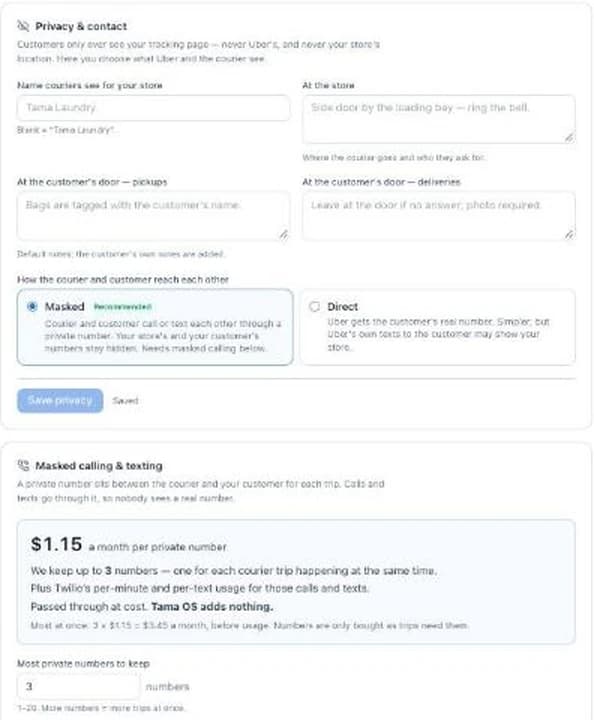
- A store name for couriers. You set the name couriers see for your store. Leave it blank and they see your business name. Add notes for where to go and who to ask for (“Side door by the loading bay, ring the bell”).
- Masked calling and texting. Each active courier trip gets a private number, so the courier and customer can reach each other with neither real number showing.
- Customer-to-courier notes. Your customer can message the courier from your tracking page. It lands in the courier’s live notes.
What masked calling costs, in plain numbers
Masked calling is opt-in. Each private number costs $1.15 a month, passed through at cost, plus Twilio’s per-minute and per-text usage for those calls and texts. Tama OS adds nothing.
You pick how many numbers to keep, one for each courier trip running at the same time. The default is 3, which is $3.45 a month before usage.
If you’d rather skip it, choose Direct: Uber gets the customer’s real number. It’s simpler, but Uber’s own texts to the customer may show your store. If privacy is why you’re here, use Masked.
What this can’t hide
Being straight about the limits:
- The courier knows the address. They have to, to pick up or drop off. Couriers work through Uber, and Tama OS can’t control what a courier says.
- Uber’s settings are yours to change. If Uber’s customer texts stay on, or you pick Direct contact, Uber’s messages may show your store.
- Your own listings. If your address is on your Google Business Profile, your website or your signage, that’s outside what delivery software controls.
60 days free. Set up privacy before the first courier goes out.
Bring-your-own Uber Direct is in early access. We're turning it on account by account. The rest of Tama OS is open now with 60 days free. Start your free trial.
Prefer to talk first? Request a walkthrough. Or see pricing.
Common questions
Will my customers see my store's address on the delivery tracking?
Not in Tama OS. Customers never get Uber's tracking page. They get your own branded tracking page, and the courier's dot is hidden while it's near your store, so the map doesn't lead back to you.
Does the courier know where my store is?
Yes, they have to. A courier can't pick up from or drop off at a place they can't find. What you control is the name couriers see for your store and the notes about where to go and who to ask for.
How do the courier and customer reach each other without sharing numbers?
With masked calling and texting turned on, each active courier trip gets a private number. The courier and customer call or text through it and neither real number shows. It costs $1.15 a month per private number plus Twilio's usage, passed through at cost. Tama OS adds nothing.
Is masked calling required?
No, it's opt-in. The other choice is Direct, where Uber gets the customer's real number. It's simpler, but Uber's own texts to the customer may show your store, so Masked is the recommended setting if privacy is the point.
Can customers send the courier a note?
Yes. From your tracking page a customer can send a message like "I'm at the side gate". It lands in the courier's live notes, with no phone numbers swapped.
What should I change in my Uber Direct account?
Turn off Uber's own customer text messages in your Uber Direct dashboard. Tama OS sends the delivery texts instead, so they come from you, not Uber.