Aloha. I own a laundry in Honolulu and built the software I wished I had. When my laundry ran on my old software, I couldn’t steer a pickup or delivery once it was booked. So I built it the other way around: you bring your own Uber account, you hold the reins, and we don’t take a cut.
New in Tama OS, November 2026. Every screenshot on this page is from Tama Laundry’s own account in Uber’s test mode, with the store location and IDs blurred.
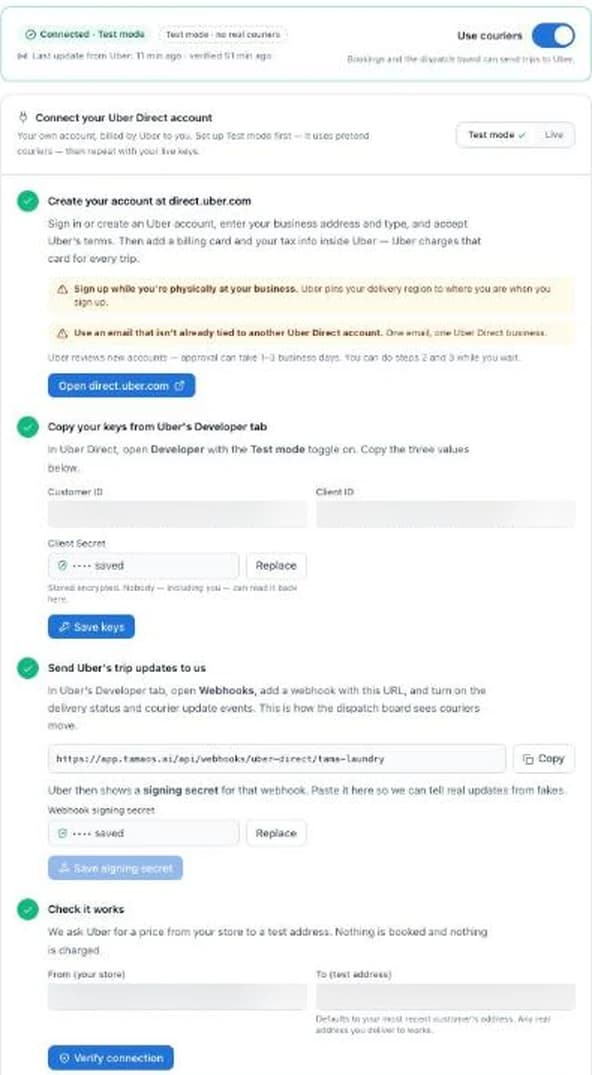
How it works: connect in five steps
Settings → Couriers walks you through it. Do it all in test mode first, which uses pretend couriers and charges nothing, then repeat with your live keys.
Sign up at direct.uber.com in your business name, and add your billing card and tax info inside Uber. Uber Direct isn’t offered everywhere, so check that it covers your area.
Copy three values from Uber’s Developer tab. They’re stored encrypted.
Paste the address Tama OS gives you into Uber so trip updates reach your dispatch board. The signing secret is checked, so fake updates are ignored.
Tama OS asks Uber for a price from your store to a test address. Nothing is booked and nothing is charged.
Switch to live keys, turn on couriers, and pick how each location uses them.
A control console for every courier trip
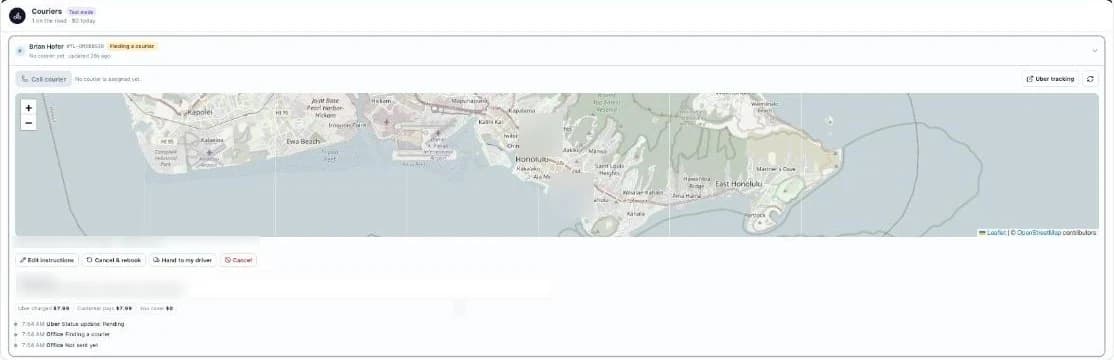
Every courier trip is a row on your dispatch board with a live map, Uber’s status timeline, and the courier’s name and vehicle once one accepts. These are the buttons on that row.
- Edit instructions
- Change pickup and drop-off notes and the ready and deadline times while the trip is live, within what Uber allows at each stage.
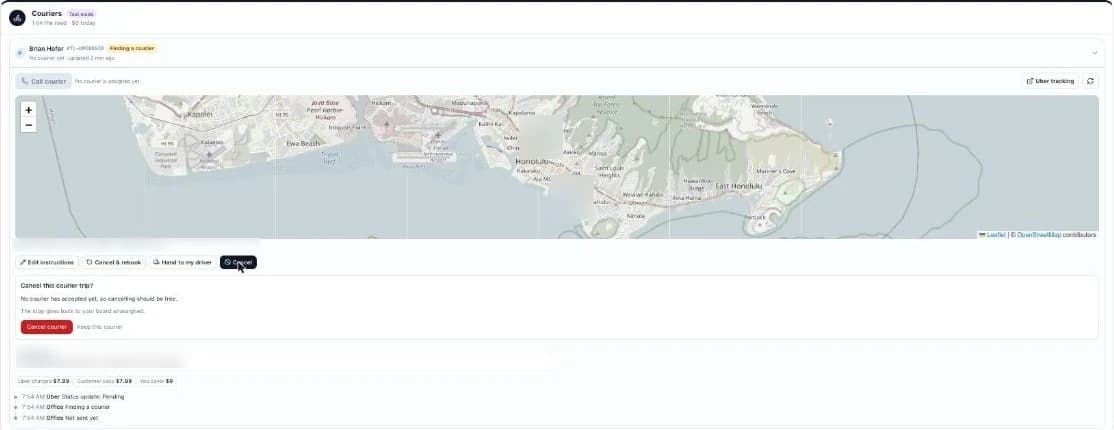
- Cancel
- Before you confirm, it tells you whether cancelling should be free. The stop goes back to your board, unassigned.
- Cancel & rebook
- One tap books a fresh courier. Your office notes come along.
- Hand to my driver
- Cancels the Uber trip and puts the stop on one of your own routes.
- Call courier
- Calls the courier with Uber’s PIN entered for you.
- Watchdog
- Alerts the office when no courier accepts in time, or the courier stops moving. You set the thresholds. Rebook and Hand to my driver are right on the alert.
- Price-jump guard
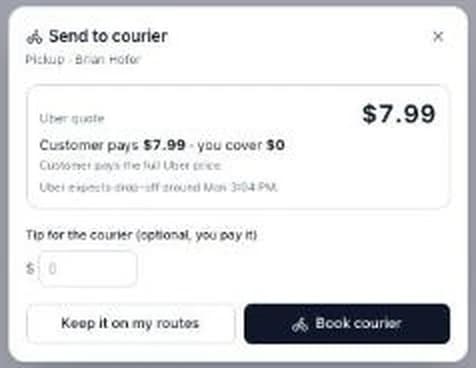
- If Uber’s price at send time is more than your allowance above the booking quote, the trip is held and you’re asked first.
- Send now & store hours
- Booked-ahead trips can go early with Send now. Trips that start or end at your store wait until it’s open.
- Unpaid gate
- A courier is never sent to deliver an unpaid order.
What Uber doesn’t allow, and what we do instead
Nobody can change the drop-off address of a live Uber Direct trip.
Not you, not us, not any software on Uber Direct. If a customer moves mid-trip, that trip can’t follow them.
In Tama OS it’s one tap: Cancel & rebook to the new address. That’s free before a courier accepts. Notes and times can still be edited live.
Uber Direct has a 50 lb limit per package.
Laundry gets heavy fast.
Tama OS checks the limit bag by bag before a courier is booked.
Uber charges for late cancels.
Per Uber’s published order form, typically around $5 after a courier accepts and before pickup, and the full trip price after pickup.
You choose whether cancel fees and no-show or return trips are passed on to the customer.
Who pays: more choices than “split it”
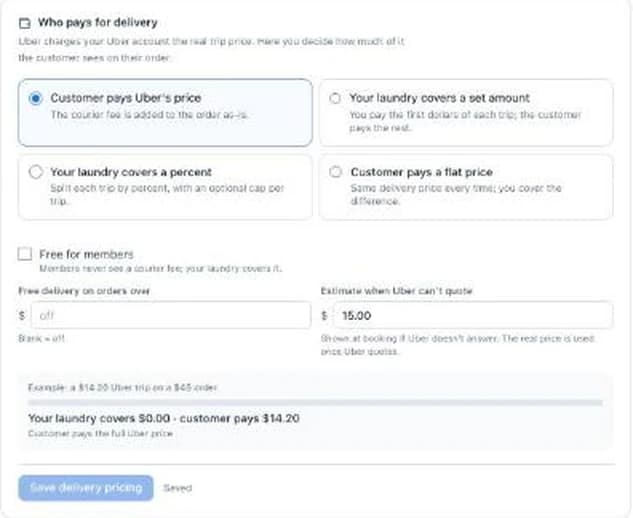
Uber always charges your Uber account the real trip price. Your setting decides how much of that your customer sees on the order. Pick one:
- Customer pays Uber’s price. The courier fee goes on the order as-is.
- Your laundry covers a set amount. You pay the first dollars of each trip, the customer pays the rest.
- Your laundry covers a percent, with an optional cap per trip.
- Customer pays a flat price. Same delivery price every time, you cover the difference.
- Free for members. Members never see a courier fee.
- Free over an order subtotal. Bigger orders ride free.
- An estimate at booking when Uber can’t quote yet. The real price is used once Uber quotes.
A worked example: a $14.20 Uber trip on a $45 order
| Option | Example setting | Customer pays | You cover |
|---|---|---|---|
| Customer pays Uber's price | No setting needed | $14.20 | $0.00 |
| Your laundry covers a set amount | You cover the first $5 | $9.20 | $5.00 |
| Your laundry covers a percent | 50%, capped at $6 a trip | $8.20 | $6.00 |
| Customer pays a flat price | Customer always pays $5.99 | $5.99 | $8.21 |
| Free for members | This customer is a member | $0.00 | $14.20 |
| Free over an order subtotal | Free over $40 (this order is $45) | $0.00 | $14.20 |
The trip price is an example, not a quote. Uber sets real prices by distance and area, and the Check it works step shows you one from your own store. Whatever you choose, receipts and the day P&L on your dispatch board show both what the courier cost and what the customer paid.
Courier-only locations, or mix with your own drivers
Each location picks one of three delivery modes:
- Own drivers. Your routes as usual. Couriers only when you send one.
- Courier only. No drivers needed at that location. Every pickup and delivery goes to Uber. It’s a way to offer pickup & delivery before you hire anyone.
- Hybrid. Your drivers by default, couriers by rules: after a set time, on certain days, in certain zones, or when routes are full. You set courier hours for each weekday.
Starting from zero drivers? Here’s how a courier-only launch works, and the math on who pays.
Your store stays private
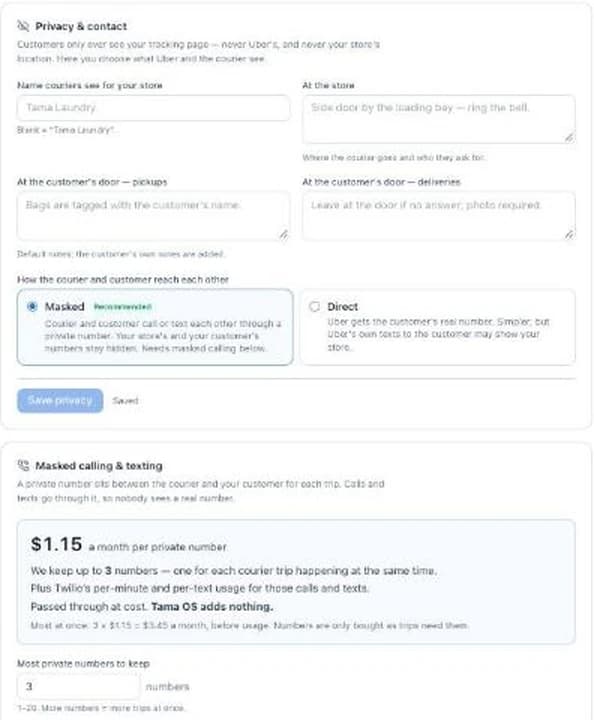
Some of us don’t want customers to know where the store is. Tama OS keeps it off what customers see:
- Customers never see Uber’s tracking page. They get your own branded tracking page, and the courier’s dot is hidden near your store.
- You set the name couriers see for your store, plus notes for where to go and who to ask for.
- Customers can message the courier from your tracking page (“I’m at the side gate”). It lands in the courier’s live notes.
- One setting to change on Uber’s side: turn off Uber’s own customer texts in your Uber Direct dashboard. Tama OS sends the texts.
Masked calling and texting, priced in the open
Turn it on and each active courier trip gets a private number, so the courier and your customer can call or text each other without either real number showing. It costs $1.15 a month per private number, passed through at cost, plus Twilio’s per-minute and per-text usage. Tama OS adds nothing. You choose how many numbers to keep; the default is 3, one for each courier trip running at the same time.
Why I built it this way
When Tama Laundry ran on Cents, I had no control once a pickup or delivery was booked. I couldn’t track the driver unless I pretended to be the customer. Texts and calls never seemed to actually reach the driver. I couldn’t cancel the route. A lot of times the driver wouldn’t move to go pick up, and it was impossible to edit the driver or drop-off instructions.
The other thing: I didn’t want customers to know where my store was, and Cents could never hide that address.
So instead of the software holding the reins, Tama OS lets every laundry use its own Uber account inside our system. You stay in control, and we really don’t take a cut. — Brian “Tama” Hofer
That’s Brian’s first-hand experience running Tama Laundry on Cents, not a review of Cents today. Written by Tama OS LLC, a vendor that competes with Cents. For published prices side by side, see Tama OS vs Cents.
What it costs
Uber’s trip prices go from Uber to you. Tama OS is a flat monthly plan sized by vans, with every feature on every plan: $199 a month for one van, $299 for up to three, $449 for unlimited vans and locations. The first 60 days are free, it’s month-to-month, and there’s no percentage of sales and no per-order fee. See full pricing.
Ask for courier access and we'll turn it on for your account, starting in Uber's test mode.
Bring-your-own Uber Direct is in early access. We're turning it on account by account. The rest of Tama OS is open now with 60 days free. Start your free trial.
Prefer to talk first? Request a walkthrough and I’ll reply myself.
Questions operators ask
Who pays Uber for the courier trips?
You do, directly. You connect your own Uber Direct account and Uber charges the card on that account for every trip, at Uber's price. Then you decide how much of that price your customer sees on their order: all of it, none of it, a set amount, a percent, a flat price, or free for members or over an order size.
Does Tama OS take a cut or mark up courier trips?
No. Tama OS takes no cut and adds no markup on courier trips. Uber's bill goes from Uber to you. Tama OS is a flat monthly plan, from $199 a month after 60 free days, with no percentage of sales and no per-order fee. The one optional extra is masked calling, where each private number is passed through at cost.
What happens if no courier accepts the trip?
The watchdog alerts your office when no courier has accepted within the time you set, or when an assigned courier stops moving. The alert has Rebook and Hand to my driver buttons on it, so you can try Uber again or put the stop on one of your own routes. Trips booked ahead aren't flagged before they're due.
Can I hide my store's address from customers?
Yes. Customers never see Uber's tracking page. They see your own branded tracking page, and the courier's dot is hidden near your store. You also set the name couriers see for your store. We recommend turning off Uber's own customer texts in your Uber dashboard, because Tama OS sends the texts.
Can I use my own drivers and Uber couriers together?
Yes. Pick Own drivers (couriers only when you send one), Courier only (every pickup and delivery at that location goes to Uber), or Hybrid (your drivers by default, couriers by rules such as after a set time, on certain days, in certain zones, or when routes are full). Any courier trip can be handed back to one of your drivers in one tap.
What about DoorDash or other courier companies?
Tama OS works with Uber Direct today. We haven't built other courier providers, so we're not promising one or a date.
Is there a weight limit for courier deliveries?
Uber Direct has a 50 lb limit per package. Tama OS checks it bag by bag, so a heavy order needs to go out in bags that are each under the limit.
What does it cost to cancel a courier?
Cancelling before a courier accepts is normally free. Uber charges a cancel fee, typically around $5, after a courier has accepted but before pickup, and the full trip price after pickup. The cancel button tells you which case you're in before you confirm. You choose whether cancel fees and no-show or return trips are passed on to the customer.
Can I try it without real couriers or charges?
Yes. Once couriers are on for your account, the connect wizard starts in Uber's test mode, which uses pretend couriers and charges nothing. The Check it works step asks Uber for a price from your store to a test address without booking anything. When you're happy, repeat the steps with your live keys.
Can a customer change the delivery address after the courier is on the way?
Not on the same trip. Uber doesn't allow anyone to change the drop-off address of a live trip. What you can do is edit the pickup and drop-off instructions and times live, within what Uber allows at each stage, or tap Cancel & rebook to send it to the new address. Cancelling is free before a courier accepts.