Pickup & delivery without drivers
Launch laundry pickup and delivery with Uber couriers. No drivers to hire.
The hardest part of adding delivery to a laundromat isn’t the software. It’s the van, the driver, the insurance and the schedule. Courier only mode skips all of that: every pickup and delivery goes to an Uber courier, booked from your own Uber Direct account.
New in Tama OS, November 2026. Screenshots are from Tama Laundry’s account in Uber’s test mode. Written by Brian Hofer, who runs Tama Laundry in Honolulu and founded Tama OS.
What “Courier only” means
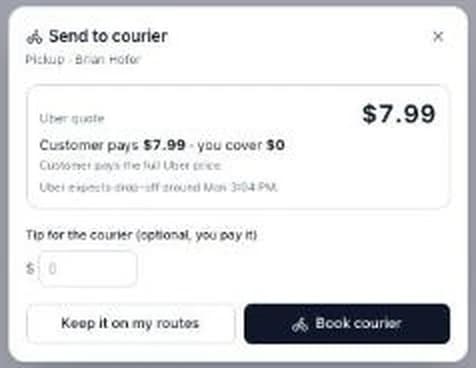
Each location in Tama OS picks a delivery mode. Set a location to Courier only and you don’t need drivers there at all. Customers book on your site as usual. When a pickup or delivery is due, it goes to Uber Direct and shows up as a row on your dispatch board, with the courier’s status, a map and the buttons to manage it.
A courier picks up at the customer’s door and brings the bags to your store or wash partner. When the order is clean, a second trip takes it back. Each of those is a separate Uber trip with its own price.
What you need to start
- A place where the laundry gets washed. Your laundromat, or a wash partner. Couriers start and end trips there.
- Store hours set in Tama OS. Booked courier trips that start or end at your store wait until it’s open.
- Your own Uber Direct account in your business name. Uber Direct isn’t in every area, so check direct.uber.com for yours.
- Tama OS. 60 days free, then from $199 a month. No percentage of sales and no per-order fee. See pricing.
Connecting Uber is a five-step wizard that starts in test mode, with pretend couriers and no charges. See the full walkthrough on the bring-your-own Uber Direct page.
The economics: who pays for each trip
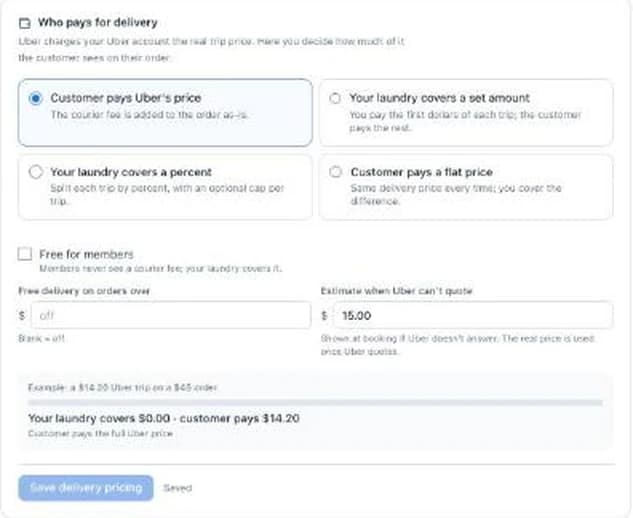
Uber charges your Uber account the real price of every trip. Tama OS adds nothing. What you decide is how much of that your customer sees on their order. Here’s one illustrative $14.20 trip on a $45 order:
| Your setting | Customer pays | You cover |
|---|---|---|
| Customer pays Uber's price | $14.20 | $0.00 |
| You cover the first $5 of each trip | $9.20 | $5.00 |
| Customer pays a flat $5.99 a trip | $5.99 | $8.21 |
| Free for members, or free over $40 | $0.00 | $14.20 |
You can also cover a percent of each trip with a cap, and show an estimate at booking when Uber can’t quote yet. Remember there are usually two trips per order, so whatever you cover, you cover twice.
Before you pick, work out three numbers for your own store:
- What a trip costs in your area. The Check it works step gets a real Uber quote from your store to a test address without booking.
- Your typical order. A minimum order or a “free over” threshold keeps courier cost a small share of each ticket.
- What you’d pay a driver instead. Including the hours they sit waiting on a slow day.
Receipts and the day P&L on your dispatch board show what each courier cost and what the customer paid, so you can see if your setting is working and change it.
What can go wrong, and what the dashboard does about it
- No courier accepts. The watchdog alerts the office after the time you set, with Rebook on the alert. It also flags a courier who stops moving.
- Uber’s price jumps between booking and sending. If it’s more than your allowance above the quote, the trip is held and you’re asked.
- The customer moves. Uber doesn’t let anyone change the drop-off address of a live trip. You can edit notes and times live, or tap Cancel & rebook to the new address, which is free before a courier accepts.
- An order isn’t paid. A courier is never sent to deliver an unpaid order.
- A heavy order. Uber Direct has a 50 lb limit per package, and Tama OS checks it bag by bag.
- A late cancel. Per Uber’s published order form, typically around $5 after a courier accepts and the full price after pickup. You choose whether to pass that on.
When you’re ready for a driver: Hybrid
Courier only is a way to start. When you hire a driver, switch the location to Hybrid: your driver takes stops by default, and couriers take the rest by your rules, such as after a set time, on certain days, in certain zones, or when routes are full. You set courier hours for each weekday, and any courier trip can be handed to your driver in one tap.
Don’t want customers to see where your store is? Tama OS keeps it off customer tracking and texts. Here’s how.
60 days free. Connect Uber in test mode first.
Bring-your-own Uber Direct is in early access. We're turning it on account by account. The rest of Tama OS is open now with 60 days free. Start your free trial.
Prefer to talk first? Request a walkthrough.
Common questions
Can I offer laundry pickup and delivery without hiring drivers?
Yes. In Tama OS, set a location to Courier only and every pickup and delivery there is sent to Uber Direct couriers from your dispatch board. You still need a place where the laundry gets washed, such as your own laundromat or a wash partner.
Whose Uber account is used?
Yours. You connect your own Uber Direct account, and Uber bills the card on that account for every trip. Tama OS takes no cut and adds no markup.
How much does an Uber courier trip cost?
Uber sets the price for each trip, based on things like distance and your area, and Tama OS shows you Uber's quote before you book. During setup, the Check it works step asks Uber for a real price from your store to a test address without booking anything, so you can see prices for your own area.
Who pays for the courier, me or my customer?
You choose. The customer can pay Uber's price, you can cover a set amount or a percent (with an optional cap), the customer can pay a flat price while you cover the difference, or delivery can be free for members or over an order subtotal. When Uber can't quote yet, the customer sees your estimate at booking.
What if no courier accepts?
The watchdog alerts your office when no courier has accepted within the time you set, with a Rebook button on the alert. If you have a driver available, Hand to my driver puts the stop on one of your routes instead.
Does this work with DoorDash?
Tama OS works with Uber Direct today. Other courier providers aren't built, and we're not promising one or a date.