Why my laundry sends couriers on its own Uber Direct account
When a courier picks up or delivers for your laundry, whose Uber account should the trip run on? Mine, and yours. Here's why: control, the invoice, no lock-in and no cut, plus the things Uber won't let anyone do.
Aloha. I own a laundry in Honolulu and I built the software I wished I had. This post is about one decision inside it: when a courier picks up or delivers for your laundry, whose Uber account should that trip run on? My answer is yours. Here's why, and here's what Uber won't let anyone do, including us.
I run Tama Laundry and I founded Tama OS, the software in this post, so read it as a vendor writing about his own product. Anything about Cents below is either my own experience, labelled that way, or from Cents' public help pages, checked November 1, 2026. Sources are at the end.
What went wrong when I didn't hold the reins
When Tama Laundry ran on Cents, I had no control once a pickup or delivery was booked. I couldn't track the driver unless I pretended to be the customer. Texts and calls never seemed to actually reach the driver. I couldn't cancel the route. A lot of times the driver wouldn't move to go pick up, maybe because of missing instructions, and it was impossible to edit the driver or drop-off instructions.
The other thing: I didn't want customers to know where my store was, and Cents could never hide that address.
That's my experience on my account at the time. It isn't a review of Cents today. Here's what Cents publishes now. Its help center says on-demand pickups and returns are done by a partner driver from Uber or Roadie. It says courier fees, courier tips and any subsidy you set are "included on your monthly invoice", meaning the Cents invoice. I couldn't find a public Cents page that lets a laundry connect its own Uber account.
So Cents uses Uber too. The difference I care about is whose account the trip runs on, and who holds the buttons when it goes sideways.
Four reasons the account should be yours
1. Control
When you're on the hook for a customer's laundry, you need to steer the trip: see where it is, fix the instructions, cancel it, send a new one. In Tama OS those buttons sit on your dispatch board, wired to your own Uber account.
2. The invoice
Uber bills you directly. Uber's Direct API terms describe Uber billing the merchant, by a monthly invoice or a card on file. Every trip is on your own Uber statement at Uber's price, and on Tama OS the receipt and the day P&L on your dispatch board show what each courier cost and what the customer paid. You can line the two up and see exactly where the money went.
3. No lock-in
You create the Uber Direct account yourself at direct.uber.com, in your business name, with your own card and tax info. If you ever leave Tama OS, the account and your billing relationship with Uber stay with you. Your courier setup isn't something you have to rebuild because you changed software.
4. No cut
Tama OS takes no cut of courier trips and adds no markup. The software is a flat monthly plan, with no percentage of sales and no per-order fee (pricing is here). Uber's charge goes from Uber to you, and that's the end of it.
What it looks like on the dispatch board
Connecting takes a five-step wizard in Settings → Couriers: create the Uber Direct account, paste your keys (stored encrypted), add the webhook so trip updates reach your board, then "Check it works", which asks Uber for a price from your store to a test address without booking anything. Do it all in Uber's test mode first, with pretend couriers and no charges, then repeat with live keys.
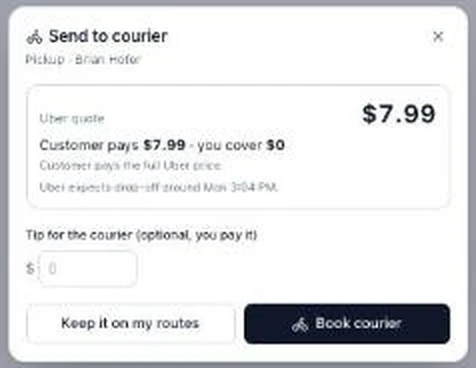
When you send a stop to a courier, you see Uber's quote first and how it splits between you and the customer:
Once it's booked, every courier trip is one row on the dispatch board: a live map, Uber's status timeline, the courier's name and vehicle once one accepts, what Uber charged and what the customer pays.
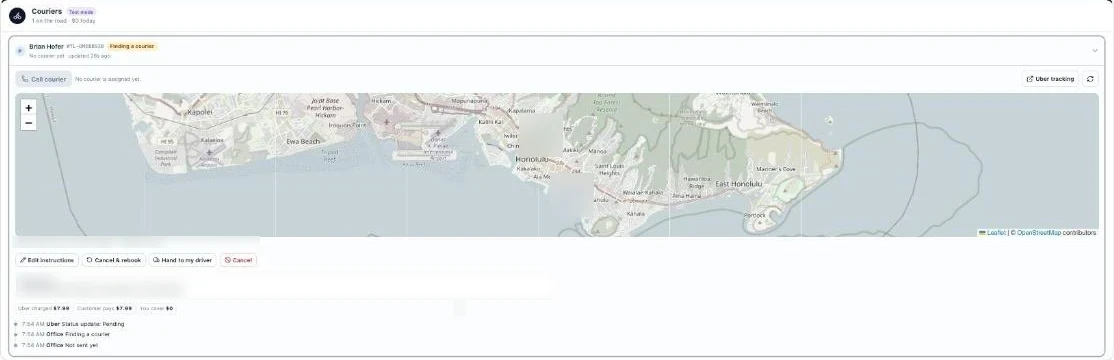
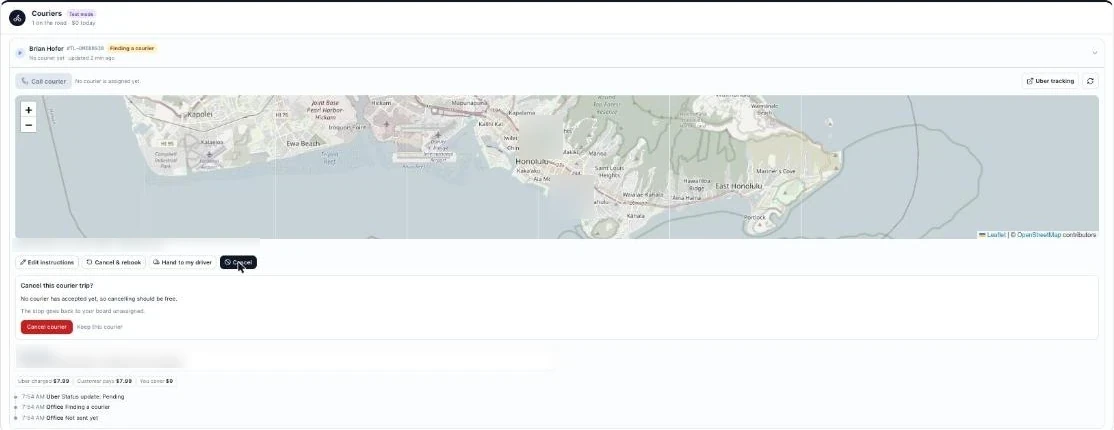
These are the buttons I wanted for years:
- Edit instructions. Change pickup and drop-off notes and the ready and deadline times while the trip is live, within what Uber allows at each stage.
- Call courier. Calls the courier with Uber's PIN entered for you.
- Cancel. It tells you whether cancelling should be free before you confirm.
- Cancel & rebook. One tap books a fresh courier, and your office notes come along.
- Hand to my driver. Cancels the Uber trip and puts the stop on one of your own routes.
- Send now. Sends a booked-ahead trip early.
Behind the row there's a watchdog that alerts the office when no courier accepts in time, or when a courier stops moving, with Rebook and Hand to my driver right on the alert. You set the thresholds. A price-jump guard holds the trip and asks you if Uber's price at send time is more than your allowance above the booking quote. A courier is never sent to deliver an unpaid order.
On privacy: customers never see Uber's tracking page or your store's location. They get your own branded tracking page, and the courier's dot is hidden near the store. You choose the name couriers see for your store. I also recommend turning off Uber's own customer texts in your Uber dashboard, because Tama OS sends the texts. More on keeping your store's address private.
The honest limits
Owning the account doesn't change Uber's rules. Here's what you should know before you rely on it.
- Nobody can change the drop-off address of a live trip. Uber's own developer docs list what can be edited after a trip is created, and the drop-off street address isn't on the list. That's true on any software. If a customer moves mid-trip, Tama OS makes it one tap: Cancel & rebook to the new address, which is normally free before a courier accepts.
- Edits have windows. Uber lets pickup notes change only until pickup starts. Drop-off notes lock when the courier is about a minute away, and the ready and deadline times lock after pickup. Tama OS follows those windows. It can't widen them.
- Cancel fees are Uber's. Uber's published order form for its Shopify channel lists $5 if you cancel after a courier accepts but before pickup, and the full delivery charge after pickup. A return trip when the customer isn't there costs about the delivery charge again. Direct-account terms aren't public, so treat these as typical. You choose what gets passed on to the customer.
- 50 lb per package. Uber's terms cap each package at 50 lb, and everything has to fit in a standard midsize car. Tama OS checks the weight bag by bag before booking, so a big family order goes out in more than one bag.
- Uber Direct isn't everywhere. Check direct.uber.com for your area before you plan around it.
- Uber Direct only. DoorDash and other providers aren't built.
- It's new. I built and tested all of this against Uber's test mode, and every screenshot here comes from test mode. I'm not going to quote trip counts or tell you how customers liked it. I'd rather show you the buttons and let you send a pretend courier yourself.
If you want the money side worked out, I wrote that up separately: what Uber Direct really costs for laundry pickup & delivery, with an example of every "who pays" setting.
Who this is for
Every location in Tama OS picks a delivery mode:
- Own drivers. Your routes as usual, couriers only when you send one.
- Courier only. No drivers needed at that location. Every pickup and delivery goes to Uber. It's a way to offer pickup & delivery before you hire anyone. Here's how a courier-only launch works.
- Hybrid. Your drivers by default, couriers by rules: after a set time, on certain days, in certain zones, or when routes are full.
I built it this way because I didn't want the software holding the reins. Each laundry uses its own Uber account inside the system, keeps control, and we really don't take a cut.
The full feature tour is on the bring-your-own Uber Direct page. If you're comparing against Cents' delivery setup specifically, see Cents delivery vs bring-your-own Uber Direct.
Run the connect wizard in Uber's test mode and send a pretend courier from your own dispatch board.
Bring-your-own Uber Direct is in early access. We're turning it on account by account. The rest of Tama OS is open now with 60 days free. Start your free trial.
Sources, checked November 1, 2026: Cents help center, delivery notifications (Uber or Roadie) and setting up on-demand delivery (monthly invoice, subsidy) · Uber Direct API terms (billing, 50 lb) · Uber Direct developer FAQ (what can be edited) · Uber Direct Shopify order form (cancel and return fees). My Cents experience is my own, from when Tama Laundry ran on Cents. Tama OS is the author's company and competes with Cents.
FAQ
Whose Uber account does a Tama OS courier trip run on?
Yours. You create an Uber Direct account in your business name, connect it in Tama OS under Settings → Couriers, and Uber bills that account for every trip at Uber's price. Tama OS takes no cut and adds no markup.
Doesn't Cents already use Uber?
Yes. Cents' help center (checked November 1, 2026) says on-demand pickups and returns are done by a partner driver from Uber or Roadie, and that courier fees, tips and subsidies are included on your monthly Cents invoice. The difference in Tama OS is whose account the trip runs on and who bills you: your own Uber Direct account, billed by Uber.
Can I change the delivery address after a courier is on the way?
Not on the same trip. Uber Direct doesn't let anyone change the drop-off address of a live trip, on any software. In Tama OS you can edit pickup and drop-off instructions and times live, within what Uber allows at each stage, or tap Cancel & rebook to send it to the new address. Cancelling is normally free before a courier accepts.
What does it cost to cancel an Uber Direct courier?
Those fees are Uber's, not Tama OS's. Uber's published order form for its Shopify channel lists $5 if you cancel after a courier accepts but before pickup, and the full delivery charge after pickup. Direct-account terms aren't public, so treat $5 as typical, not guaranteed. Tama OS tells you which case you're in before you confirm, and you choose what to pass on to the customer.
Does Tama OS work with DoorDash?
Tama OS works with Uber Direct today. Other courier providers aren't built, so I'm not promising one or a date.
Review your booking, delivery and billing requirements with Tama OS.